FXVPS.Pro Review 2026: Speed, Latency, Pricing, MT4/MT5 Support and Trading Performance
If you are running Expert Advisors, automated forex strategies, scalping systems, copy trading software, or multiple MetaTrader terminals, choosing the right Forex VPS can make a noticeable difference to the reliability of your trading setup.
In this FXVPS.Pro review, we take a detailed look at the company’s Forex VPS hosting, including server performance, latency, MT4 and MT5 support, pricing, VPS plans, dedicated servers, technical support, uptime, security, and the type of trader each plan is designed for.
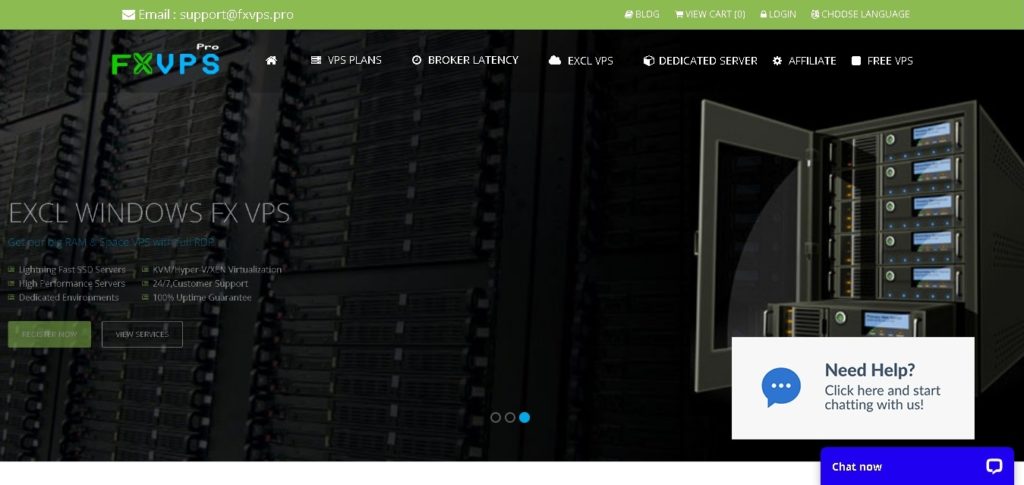
FXVPS.Pro positions itself specifically around Forex and automated trading, rather than offering a generic VPS service. Its website lists regular Windows VPS plans, latency-optimized VPS solutions, exclusive VPS servers, and dedicated servers designed for traders running demanding trading environments.
FXVPS.Pro at a Glance
For traders who want the quick version, FXVPS.Pro offers:
- Windows VPS hosting optimized for Forex trading
- MetaTrader 4 and MetaTrader 5 support
- cTrader support
- Expert Advisor hosting
- Automated trading support
- Low-latency VPS options
- Dedicated IP and full RDP access
- Fully managed VPS options
- 24/7 human technical support
- Exclusive VPS plans with higher RAM and CPU resources
- Forex dedicated servers
- SSD/NVMe storage options
- A 3-day refund guarantee
- VPS plans starting from $4.89/month on the site’s annual pricing
- Dedicated server options for traders running larger numbers of terminals
The company also publishes broker latency testing for several broker/server combinations, which is particularly useful for traders whose strategies are sensitive to execution speed.
What Is FXVPS.Pro?
FXVPS.Pro is a VPS hosting provider focused on Forex traders and automated trading applications.
The main purpose of a Forex VPS is simple: instead of running MetaTrader on your personal computer and relying on your home internet connection, you install your trading platform and Expert Advisors on a remote Windows server.
The VPS stays online while your computer can be switched off.
This setup is especially useful for traders running:
- MetaTrader 4 Expert Advisors
- MetaTrader 5 Expert Advisors
- Automated Forex strategies
- Scalping EAs
- Grid and algorithmic strategies
- Copy trading systems
- Multiple trading accounts
- cTrader
- Crypto trading platforms
- Trading robots that need continuous connectivity
FXVPS.Pro specifically markets its servers for these types of applications and states that its VPS environments support major trading platforms and brokers.
FXVPS.Pro Speed and Performance
Speed is one of the most important factors when choosing a VPS for Forex trading.
However, it is important to understand what “fast” actually means in Forex VPS hosting.
A VPS does not make a trading strategy profitable by itself. Instead, its job is to provide a stable computing environment and a network connection that can reduce unnecessary delays between the trading platform and broker server.
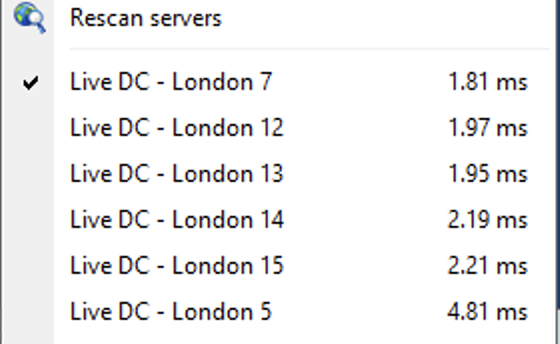
FXVPS.Pro offers a dedicated latency-optimized VPS service designed to place servers closer to broker infrastructure. The company publishes latency measurements for different broker and data-center combinations, with some listed connections showing single-digit millisecond latency. For example, its published table shows several London and Amsterdam measurements below 10 ms for selected brokers.
This is particularly relevant for:
- Forex scalpers
- News traders
- High-frequency strategies
- Expert Advisors
- Automated execution systems
- Traders using pending orders
- Traders running multiple EAs
The actual latency a trader experiences will depend on the broker, the broker’s trading server, the selected VPS location, network conditions, and the route between the VPS and broker.
Therefore, the best approach is not simply to choose the VPS with the lowest advertised number. The important question is whether the VPS location is close to your particular broker’s trading server.
Low Latency and Forex Trading
Latency is measured in milliseconds and represents the time required for data to travel between systems.
For an automated trading system, the basic process can look like this:
Trading Signal ? MetaTrader ? VPS Network ? Broker Server ? Order Execution
The shorter and more stable this connection is, the less network delay there may be between the trading platform and broker.
FXVPS.Pro specifically promotes its low-latency VPS solutions for Forex brokers and provides a broker latency table that allows traders to compare selected locations.
For strategies that hold positions for hours or days, a few milliseconds may not be particularly important.
For fast scalping systems, however, network latency can be much more relevant.
That distinction is important when evaluating any Forex VPS provider.
MT4 and MT5 Support
One of the strongest reasons to consider a Forex-specific VPS is compatibility with MetaTrader.
FXVPS.Pro supports both:
MetaTrader 4 (MT4)
MetaTrader 5 (MT5)
The regular VPS plans specify the number of MT4/MT5/cTrader instances that can be hosted depending on the selected package. For example, the Basic plan is listed for up to one instance, while higher plans support progressively more instances.
This makes the service suitable for traders who want to keep their EAs running 24/7 without leaving a personal PC switched on.
For example, a trader could install:
- MT4 + one Expert Advisor
- MT5 + multiple EAs
- Several MT4 accounts
- Multiple broker terminals
- Automated copy trading software
The number of terminals you can comfortably run will ultimately depend on the VPS resources and the CPU/RAM requirements of the software.
FXVPS.Pro VPS Plans and Pricing
One of the attractive aspects of FXVPS.Pro is the range of available configurations.
The Regular Forex VPS range includes several tiers, from entry-level hosting to larger configurations designed for traders running multiple terminals.
According to the current pricing page, the regular plans include:
Basic
- 1 GB RAM
- 18 GB disk space
- 1 CPU core
- Up to 1 MT4/MT5/cTrader instance
- Starting from $4.89/month with the listed annual pricing
Standard
- 2 GB RAM
- 20 GB disk space
- 1 CPU core
- 1�2 trading instances
- Starting from $6.29/month with the listed annual pricing
Professional
- 3 GB RAM
- 22 GB disk space
- 2 CPU cores
- 1�3 trading instances
- Starting from $9.79/month with the listed annual pricing
Enterprise
- 4 GB RAM
- 25 GB disk space
- 2 CPU cores
- 1�4 trading instances
- Starting from $13.29/month with the listed annual pricing
Corporate
- 6 GB RAM
- 30 GB disk space
- 3 CPU cores
- 1�6 trading instances
- Starting from $18.89/month with the listed annual pricing
Custom VPS
The custom configuration is designed for traders who need substantially more resources. The listed configuration range goes from 1�64 GB RAM, 1�32 CPU cores, and 20�500 GB disk space.
Prices and promotional rates can change, so traders should verify the current price on the official pricing page before ordering.
Exclusive VPS for Professional Traders
FXVPS.Pro also offers an Exclusive VPS range for users who need more resources than the regular plans provide.
The current configurations include:
- 12 GB RAM / 4 CPU cores
- 16 GB RAM / 6 CPU cores
- 24 GB RAM / 8 CPU cores
- 48 GB RAM / 12 CPU cores
The plans also offer larger disk allocations and support more trading instances than the smaller VPS packages.
This type of VPS makes more sense for traders who are running:
- Many MT4 terminals
- Many MT5 terminals
- Multiple Expert Advisors
- Resource-intensive EAs
- Several broker accounts
- Automated trading infrastructure
- Trading applications alongside MetaTrader
For someone running one lightweight EA, paying for a large Exclusive VPS would generally be unnecessary. The better approach is to match the VPS resources to the actual CPU and RAM usage of the trading setup.
Premium Latency-Optimized VPS
Another interesting option is FXVPS.Pro’s Premium Optimized VPS service.
The company describes these servers as using SSD/NVMe storage and being optimized for low latency. It also states that traders can choose server locations or provide their broker information so that an appropriate server location can be selected.
This is arguably one of the more important features for serious automated traders.
Instead of looking only at RAM and CPU, a trader should consider:
Broker location + VPS location + network latency + execution requirements
For example, if your broker’s trading server is located in London, choosing a VPS with a strong network route to London may make more sense than selecting a geographically closer server that has a poor route to the broker.
Forex Dedicated Servers
For professional traders and businesses that need considerably more resources, FXVPS.Pro also offers dedicated server configurations.
The listed dedicated server plans include configurations ranging from 16 GB RAM up to 64 GB RAM, with SSD NVMe storage and enterprise-grade CPU options. Depending on the plan, the specifications include Intel Xeon or AMD processors, multiple CPU cores, and higher bandwidth allocations.
The dedicated server options are better suited to users running large trading environments rather than a single MetaTrader account.
A dedicated server can be useful for:
- Professional algorithmic trading
- Multiple trading terminals
- Large EA portfolios
- Multiple brokers
- Trading businesses
- Automated trading infrastructure
- High-resource applications
FXVPS.Pro lists four dedicated server configurations, with monthly prices currently ranging from $79.99 to $249.99 depending on the configuration.
Hardware and Storage
Hardware matters because a trading VPS needs to run continuously and handle the workload generated by MetaTrader and Expert Advisors.
FXVPS.Pro’s standard and premium offerings include different combinations of CPU, RAM, and storage.
The regular plans use varying hardware configurations, while the premium and dedicated offerings provide substantially larger resources. The company also advertises SSD/NVMe storage on its optimized and dedicated offerings.
For most traders, CPU and RAM are more important than having enormous storage capacity.
A single MT4 terminal with a lightweight EA does not normally require a high-end dedicated server.
On the other hand, running 10, 20, or more terminals with multiple indicators, EAs, charts, and data feeds can require considerably more CPU and RAM.
Uptime and Reliability
A Forex VPS needs to remain online because an automated strategy cannot execute trades if the server is offline.
FXVPS.Pro advertises a 99.9% uptime guarantee for its VPS services and highlights high availability across its infrastructure. Its homepage also lists a 99.99% uptime figure in its service highlights, so users should check the exact SLA and plan-specific terms before relying on a particular uptime figure.
This is an important point for automated traders.
Even a short interruption can potentially cause:
- EA disconnections
- Missed trading signals
- Delayed orders
- Trading terminal restarts
- Data feed interruptions
For that reason, uptime guarantees should always be evaluated alongside the provider’s actual SLA and support policy.
24/7 Human Support
Technical support is another important factor when selecting a Forex VPS.
FXVPS.Pro advertises 24/7 live human support and managed VPS services. The company also describes its dedicated server service as a managed solution where technicians can assist with setup and configuration.
This can be especially useful for traders who are comfortable with MetaTrader but do not want to spend time troubleshooting Windows VPS configuration.
Typical situations where support can be useful include:
- Installing MetaTrader
- Installing Expert Advisors
- Setting up RDP
- Configuring multiple terminals
- Troubleshooting connectivity
- Moving an existing MT4/MT5 setup
- Checking VPS performance
- Configuring trading software
Full RDP Access
FXVPS.Pro provides full RDP access with its VPS services.
Remote Desktop Protocol allows traders to access the Windows VPS from another computer or device.
Once connected, the VPS behaves much like a normal Windows computer.
You can:
- Log into the VPS.
- Install MetaTrader.
- Log into your broker.
- Install your Expert Advisor.
- Configure the charts and settings.
- Enable automated trading.
- Disconnect from the VPS.
The EA can continue running on the VPS after you disconnect, provided the server and trading platform remain operational.
This is one of the primary advantages of using a VPS for automated Forex trading.
Dedicated IP Address
FXVPS.Pro also advertises dedicated IP access.
A dedicated IP can be useful for traders who want a consistent network address for their VPS environment.
It can also be helpful for certain security configurations and services that require IP whitelisting.
However, traders should not confuse a dedicated IP with lower Forex latency. The two are separate features.
FXVPS.Pro for Expert Advisors
If you use Expert Advisors, the VPS can be particularly useful.
An EA may need to operate continuously during market hours. Running it on a home computer introduces several potential interruptions:
- Internet outages
- Windows updates
- Power failures
- Computer restarts
- Wi-Fi problems
- Accidental shutdowns
- Hardware issues
A VPS moves the trading environment into a professionally hosted data-center environment.
FXVPS.Pro specifically markets its VPS solutions for EA hosting and automated Forex trading.
For an automated strategy, the ideal VPS environment should provide:
Stable connection + low latency + sufficient CPU/RAM + high availability
Is FXVPS.Pro Good for Scalping?
This depends heavily on the broker and strategy.
For scalping, latency can matter much more than it does for long-term trading.
FXVPS.Pro’s low-latency offering and published broker latency measurements make it relevant to traders who specifically care about execution connectivity. The company’s published tests show that latency varies significantly depending on the broker and server location, which reinforces the importance of selecting the correct VPS location.
If you are running a scalping EA, I would pay particular attention to:
- Broker server location
- VPS location
- Average ping
- Network stability
- CPU load
- EA processing time
- Spread
- Broker execution policy
A VPS cannot eliminate broker-side execution delays, market slippage, spread changes, or liquidity problems.
Is FXVPS.Pro Suitable for Gold Trading?
Gold traders using XAUUSD Expert Advisors can also benefit from a VPS.
This is particularly relevant when an EA needs to remain online during major market sessions or when the strategy relies on automated entries and exits.
However, the VPS does not determine the profitability of a gold trading strategy.
It simply provides the infrastructure on which the strategy runs.
For an XAUUSD EA, I would generally look at:
- VPS latency to the broker
- CPU usage
- RAM usage
- MT4/MT5 stability
- Broker server location
- Number of terminals being run
- EA complexity
The same principle applies to Forex pairs, indices, and other instruments.
FXVPS.Pro for Multiple MT4 and MT5 Accounts
One of the biggest advantages of VPS hosting is the ability to run multiple trading terminals from one remote environment.
The higher FXVPS.Pro plans are designed to support more MT4/MT5/cTrader instances, with the exact number depending on the selected package.
This can be useful if you manage:
- Multiple broker accounts
- Multiple EAs
- Different strategies
- Different trading symbols
- Separate demo and live accounts
- Copy trading accounts
For example, a trader testing several EAs may prefer a Professional or Enterprise VPS rather than running everything from a personal computer.
Security and Isolation
A VPS also separates the trading environment from your everyday computer.
This means you can keep MetaTrader and automated trading software running on a dedicated Windows environment rather than installing everything on your primary workstation.
FXVPS.Pro promotes dedicated environments and virtualization technologies on its higher-end VPS offerings.
Nevertheless, traders should still follow normal security practices:
- Use strong passwords
- Protect the RDP account
- Avoid installing unnecessary software
- Keep trading software updated
- Use reputable Expert Advisors
- Avoid sharing RDP credentials
- Monitor account activity
- Use broker-side security features where available
3-Day Refund Guarantee
FXVPS.Pro currently advertises a 3-day refund guarantee across its VPS offering.
The company describes this as a way for customers to try the service with reduced purchasing risk.
Before purchasing, it is still sensible to check the current refund terms and conditions, particularly if your primary reason for buying the VPS is low latency.
FXVPS.Pro Free VPS Trial
The company also advertises a free VPS trial on its “Best Forex VPS” page.
A trial can be useful because VPS performance is highly dependent on the broker and location.
Rather than judging a Forex VPS only by specifications, traders can test:
- Ping to their broker
- MT4/MT5 connection stability
- CPU usage
- RAM usage
- EA performance
- Terminal uptime
- Order execution connectivity
This type of testing is much more useful than simply comparing the amount of RAM offered by different VPS companies.
FXVPS.Pro Pros and Cons
Pros
Forex-focused infrastructure
FXVPS.Pro is specifically marketed toward Forex and automated trading rather than being a generic web-hosting VPS provider.
MT4 and MT5 support
The service supports the two most widely used MetaTrader platforms, along with cTrader.
Low-latency options
The provider publishes latency measurements for different broker/server combinations and offers latency-optimized VPS hosting.
Wide range of plans
There are entry-level plans for individual traders as well as high-resource VPS and dedicated server options.
24/7 support
The company advertises 24/7 human support and managed VPS services.
Full RDP access
Users can remotely manage their Windows trading environment.
Dedicated server options
Professional users can move from VPS hosting to dedicated hardware when their requirements increase.
3-day refund guarantee
The company currently advertises a 3-day refund guarantee.
Cons
Performance depends on the broker
The lowest advertised latency is not necessarily the latency you will receive. The correct VPS location depends on the location of your broker’s trading server.
Plan specifications vary significantly
Entry-level plans have limited RAM and CPU resources. Traders running several terminals or demanding EAs may need a higher package.
Dedicated servers are considerably more expensive
Professional dedicated infrastructure can cost substantially more than a standard VPS, although it is aimed at a different type of customer.
Marketing performance claims should be tested
Terms such as “lightning fast” or “ultra-low latency” should always be evaluated using your own broker connection rather than treated as a guarantee of actual trade execution speed.
Which FXVPS.Pro Plan Should You Choose?
The best plan depends on what you are actually running.
For one MT4/MT5 EA
The Basic plan may be enough if the EA is lightweight and you only need a single trading terminal.
For several EAs
The Standard or Professional plans provide more RAM and CPU resources and support more trading instances.
For multiple MT4/MT5 terminals
The Enterprise or Corporate plans make more sense when you need to run several terminals simultaneously.
For professional automated trading
The Exclusive VPS plans provide substantially more RAM and CPU resources.
For large trading operations
A dedicated server becomes more appropriate when you need significant computing resources, many terminals, or greater control over the server environment.
These recommendations are based on the published resource allocations and instance limits; actual requirements will vary according to the EAs and applications being run.
FXVPS.Pro vs a Normal Windows VPS
A standard Windows VPS can technically run MetaTrader.
So why use a Forex-focused provider?
The main difference is optimization and network positioning.
A general VPS company may give you:
- CPU
- RAM
- Storage
- Windows
- Remote Desktop
A Forex-oriented VPS provider is more likely to focus on:
- Broker connectivity
- Trading platform compatibility
- Low latency
- EA hosting
- Multiple MetaTrader terminals
- Trading-related technical support
FXVPS.Pro’s product range is built around those trading requirements.
Who Should Use FXVPS.Pro?
FXVPS.Pro could be worth considering if you are:
- A Forex trader using MT4
- An MT5 trader
- An Expert Advisor user
- A scalper
- A copy trader
- Running automated strategies
- Managing multiple trading accounts
- Running several MetaTrader terminals
- Looking for a low-latency trading VPS
- Trading Forex, gold, or other supported instruments
- Looking for managed VPS support
It is less necessary for someone who trades manually from a personal computer and does not require 24/7 automated execution.
Final Verdict: Is FXVPS.Pro Worth It?
FXVPS.Pro has a clear focus on Forex trading infrastructure, and its product range covers a wide spectrum of users, from traders running a single MT4 or MT5 Expert Advisor to professional users requiring high-resource VPS hosting or dedicated servers.
Its strongest selling points are the range of VPS configurations, MT4/MT5 support, latency-focused hosting, multiple resource tiers, managed services, full RDP access, and dedicated server options.
The pricing is also competitive at the entry level, with the regular Basic plan currently listed from $4.89/month under the site’s annual pricing structure. More powerful plans are available for traders running multiple terminals and resource-intensive automated systems.
The most important thing to remember, however, is that VPS speed should not be judged by CPU or RAM alone.
For Forex trading, latency to your specific broker matters.
A trader running a fast EA should test the VPS connection to the broker’s actual trading server and compare the results before committing to a long-term configuration.
Overall, FXVPS.Pro is a provider worth considering for traders who want a VPS specifically designed around automated Forex trading, MetaTrader hosting, and low-latency connectivity rather than a generic Windows VPS.
FXVPS.Pro Rating
Forex Trading Optimization: 4.5/5
MT4/MT5 Support: 5/5
VPS Plan Variety: 4.5/5
Low-Latency Options: 4.5/5
Scalability: 5/5
Support: 4.5/5
Entry-Level Pricing: 4.5/5
Dedicated Server Options: 5/5
Overall: 4.6/5
For traders running automated strategies, Expert Advisors, or multiple MetaTrader terminals, FXVPS.Pro offers a broad range of configurations and trading-focused infrastructure. The final choice should be based on your broker’s server location, required latency, number of terminals, and actual CPU/RAM requirements.
Frequently Asked Questions About FXVPS.Pro
What is FXVPS.Pro?
FXVPS.Pro is a Forex-focused VPS provider offering Windows VPS hosting, low-latency VPS solutions, Exclusive VPS plans, and dedicated servers for automated and manual trading environments.
Does FXVPS.Pro support MT4?
Yes. FXVPS.Pro lists MetaTrader 4 support across its Forex VPS plans.
Does FXVPS.Pro support MT5?
Yes. MetaTrader 5 is supported by the listed Forex VPS plans.
Can I run Expert Advisors on FXVPS.Pro?
Yes. The service is specifically marketed for EA hosting and automated Forex trading.
Is FXVPS.Pro suitable for scalping?
It can be suitable for latency-sensitive strategies because the company offers latency-optimized VPS hosting and publishes broker/server latency measurements. However, actual performance depends on your broker and the selected VPS location.
How much does FXVPS.Pro cost?
The current regular VPS pricing starts from $4.89/month under the listed annual pricing for the Basic configuration. Higher-performance VPS and dedicated server plans cost more.
Does FXVPS.Pro offer dedicated servers?
Yes. FXVPS.Pro offers several dedicated server configurations with higher RAM, CPU, NVMe storage, and bandwidth resources.
Does FXVPS.Pro offer a refund?
The company currently advertises a 3-day refund guarantee. Check the current terms before ordering because policies can change.
Does FXVPS.Pro provide 24/7 support?
Yes. The company advertises 24/7 human technical support.
Is a Forex VPS necessary?
A VPS is not necessary for every trader. It becomes particularly useful when running automated strategies, Expert Advisors, copy trading systems, or multiple trading terminals that need to remain online continuously.
What is the best FXVPS.Pro plan?
There is no single best plan for everyone. A trader running one lightweight EA may need only an entry-level VPS, while someone running many MT4/MT5 terminals may require an Enterprise, Exclusive, or dedicated configuration.
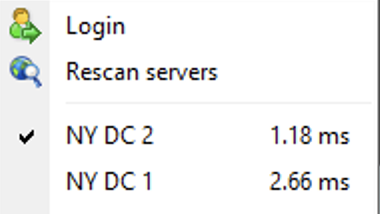
fxvps.pro possesses the capacity of delivering the latency in a millisecond. Our data centers are located at New York, London, Amsterdam, Montreal to ensure shortest latency time.
Check Our Top Broker :�Here